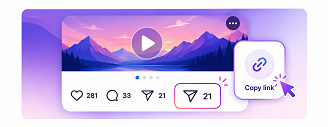

Open Instagram and find the video you want to download. Tap the Share button and select Copy Link to copy the video URL.
Download Instagram videos, reels, story, photo, igtv, mp3, audio in high quality with SaveInsta
SaveInsta is a free online Instagram video downloader that lets you save videos from public Instagram posts directly to your device. Simply copy the Instagram video link, paste it into the downloader, and download the video in the best available quality. No account, app, or browser extension is required. SaveInsta works directly in your browser on iPhone, Android, Windows, Mac, and other devices. You can also use SaveInsta to download Instagram Reels, photos, Stories, IGTV videos, and audio with dedicated tools for each content type.
Open Instagram and find the video you want to download. Tap the Share button and select Copy Link to copy the video URL.
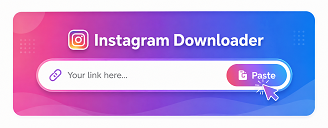
Open SaveInsta in your browser and paste the copied Instagram link into the download box at the top of the page.

Click Download, wait a moment while SaveInsta processes the link. Choose the available download option and save the Instagram video to your device.
Use one free online toolkit to download public Instagram videos, photos, Reels, Stories, IGTV, and MP3 files quickly.

Download public Instagram videos from single posts or carousels as clean MP4 files in the best quality available.
Download Video
Save photos from public Instagram posts in the best available image quality directly to your device.
Download Photo
Download multiple photos and videos from public Instagram carousel posts and save each available item separately.
Download Carousel
Download public Instagram Reels in the best available video quality directly from your browser.
Download Reels
Save available photos and videos from public Instagram Stories directly to your device without installing an app.
Download Stories
Download supported long-form Instagram videos and legacy IGTV content in the best available quality.
Download IGTV
Extract and download available audio from supported Instagram videos and Reels for offline listening.
Download MP3
View available Stories from public Instagram profiles online without logging in or installing the Instagram app.
Story Viewer
Download public Instagram content without signing in or connecting an account.

Save media using the best quality made available by the original public post.

No software, extension, or mobile app is needed; everything works in your browser.

Handle videos, photos, Reels, Stories, IGTV, and audio from one place.

Works on iPhone, Android, Windows, macOS, tablets, and modern browsers.

The downloader is designed for publicly available Instagram media only.

An Instagram video downloader is an online tool that lets you save videos from public Instagram posts to your device using the post URL.
Copy the link to the Instagram video, paste it into the SaveInsta download box, and click Download. Once the link is processed, choose the available download option to save the video.
Yes. SaveInsta is free to use online. You don't need to create an account, subscribe, or install additional software to use the downloader.
No. SaveInsta does not require you to log in or connect an Instagram account. The downloader works with supported content that is publicly available.
Yes. SaveInsta provides dedicated tools for downloading supported public Instagram Reels, Stories, photos, videos, and other available media.
SaveInsta provides the best available video quality from the source. Available quality may vary depending on the original Instagram post.
Yes. SaveInsta works in modern web browsers on iPhone, iPad, Android, Windows, macOS, and other supported devices.
No. SaveInsta works directly in your web browser, so there is no need to install an app, extension, or desktop software.
No. SaveInsta is designed for publicly available Instagram content and cannot access media from private accounts.
The download location depends on your device and browser settings. Files are typically saved in the Downloads folder on computers or the browser download location or Files app on mobile devices.